O in short: Replace multiple Excel spreadsheets. Change hyperlinks and UNC paths when servers get renamed update names addresses phone numbers data sources translate with find/replace lists. Automwell known
|
 Categories Categories |
|
|
|
|
|
ExcelPipe Find and Replace for Excel 7.8 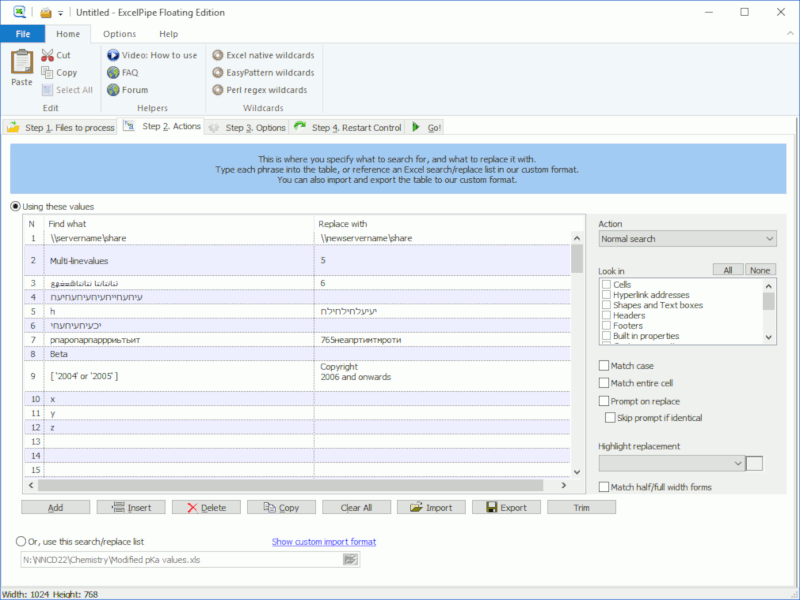
Click to enlargeDescription:Batch Search and Replace multiple Excel spreadsheets. ExcelPipe makes search/replace tasks with Microsoft .xls .xlsx simple. Change hyperlinks, UNC paths and Data Sources when servers get renamed; update contact details such as names, addresses and phone numbers; translate spreadsheets with large find/replace lists imported from excel/csv/tab; update Microsoft SharePoint documents or Microsoft Namespace Server mappings. Using ExcelPipe is simple: 1) Drag and drop files from Windows Explorer to ExcelPipe, 2) Add one or more search/replace pairs. 3) Go! ExcelPipe can change thousands or millions of spreadsheets, and can make multiple changes simultaneously to save time. It automatically handles read-only files, passwords and other protection, and it can be automated to run when you need it to. No user interaction is required. It even includes restart recovery in case Microsoft Excel crashes! ExcelPipe offers many more search and replace options than Microsoft Excel; such as hyperlinks, text boxes, shapes, document properties (such as Title, Subject, Author, Company etc), data sources and more. EasyPatterns and Perl regex patterns can also be used for more sophisticated replacements. ExcelPipe is fully Unicode compliant (allowing Find and Replace with international character sets), can handle an unlimited number of spreadsheets and find/replace pairs, and cabn be fully automated from the command line. ExcelPipe can search/replace .XLS, .XLSX and OpenDocument .ODS formats. NEW! Now can find and replace images inside Excel spreadsheets Microsoft recommends ExcelPipe to its customers for good reason!
 | Price $ 99 /

Purchase ExcelPipe Find and Replace for Excel
Get it Now(to see additional options, click Buy Now) Type: Shareware File size: 11233 Kb Date: 06/29/2018 HomepageInstall support: Install and Uninstall OS: Win2000, WinXP, Win7 x32, Win7 x64, Windows 8, Windows 10, WinServer, WinOther, Windows2000, Windows2003, Windows Server 2012, Windows Tablet PC Edition 2005, Windows Media Center Edition 2005, WinVista, Windows Vista Starter, Windows Vista Home Basic, Windows Vista Home Premium, Windows Vista Business, Windows Vista Enterprise, Windows Vista Ultimate, WinVista x64, Windows Vista Home Basic x64, Windows Vista Home Premium x64, Windows Vista Business x64, Windows Vista Enterprise x64, Windows Vista Ultimate x64 System requirements: Microsoft Excel or Office 2016/360/2013/2010/2007/Vista, 2003, XP or higher Language: English, Chinese, ChineseSimplified, ChineseTraditional, French, German, Italian, Japanese, Russian, Spanish Recent changes in this Major Update:New! Data Sources can now be updated (Office 2016+). Updated status tab warning about MS Excel already running to only display when no ExcelPipe job is running. Added cleared error messages for EasyPattern and Perl Regex errors. Removed logging warnings. | |
|




